
kagent's runbook-agent pattern combines live Kubernetes cluster diagnostics with RAG (Retrieval-Augmented Generation) search over a team's internal runbooks. One AI agent, two tool sources, so it can answer both "why is this failing right now" and "what's our documented process" in the same conversation.
Last time, I built a kagent AI agent that could answer real questions about a live Kubernetes cluster.
It could inspect pods.
Check events.
Pull logs.
Tell you what was actually happening right now.
But it had one big gap.
It had no idea about our team's actual internal processes.
It could see that a deployment was failing. It had no idea what our team's documented process said to do about it. Ask it "what's our process for restarting this service" and you'd get a generic Kubernetes explanation, not our explanation.
So this time, I gave it both: live cluster access, and a searchable knowledge base built from our own internal runbooks. Watch what happens when I ask it two very different questions.
Video Demo
What Is RAG, In One Paragraph
RAG, retrieval augmented generation, is a way to make a large language model answer questions using your own documents without retraining the model. An LLM like Claude never saw your internal runbooks during training, so on its own it can't cite them. RAG fixes that by adding a search step before the model answers, the system searches your content for the relevant passages and pastes them into the model's context as extra information. In this setup, that search step runs against a small vector database built from a team's own Kubernetes runbooks, so the agent can quote the actual documented process instead of guessing at a generic one. The result is one agent that can answer both "what's happening in my cluster right now" and "what's our process for handling this," grounded in real, current sources for both.
The Agent, Two Tool Sources
Open the kagent dashboard and the agent I want to talk about is called runbook-agent.
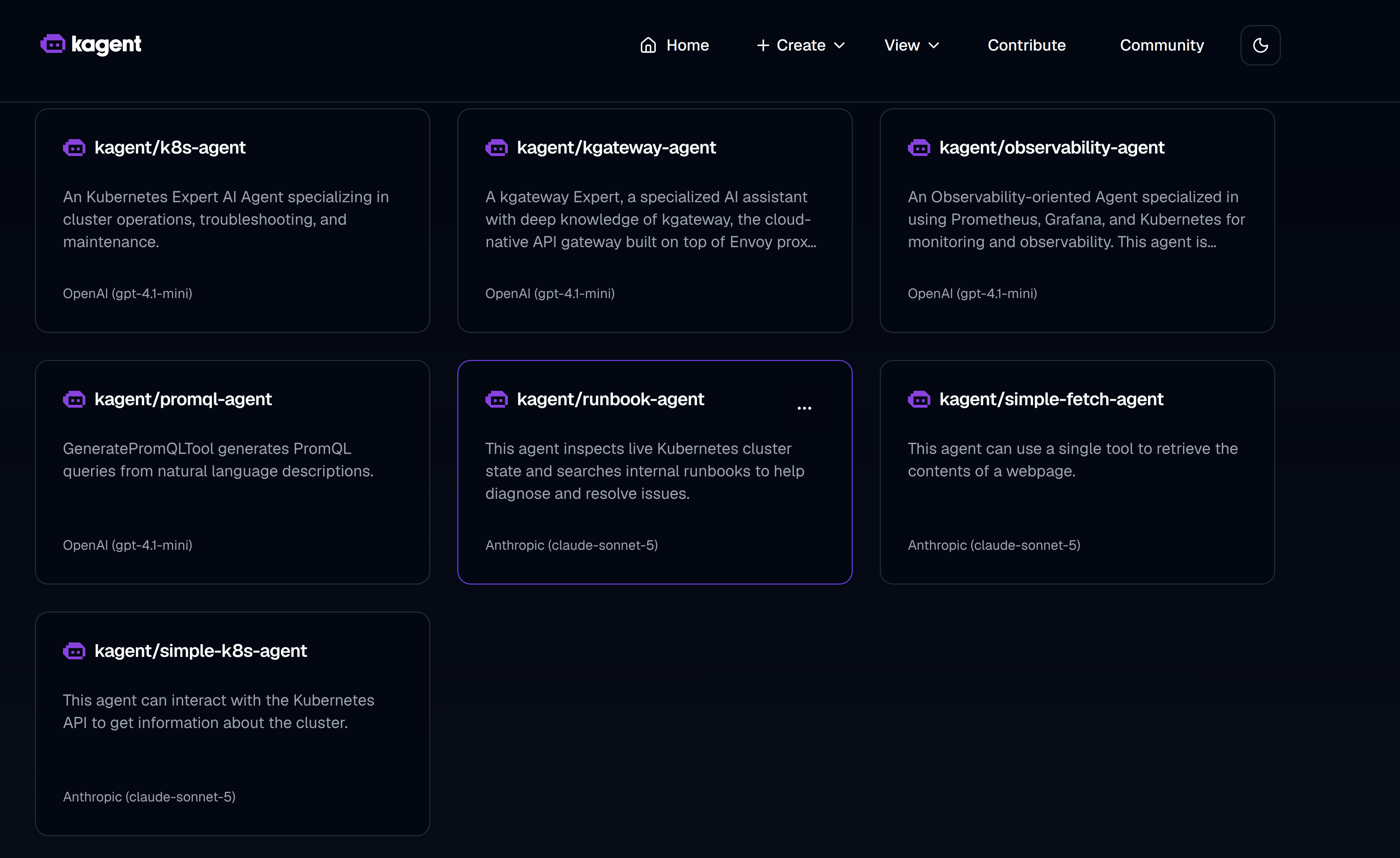
It sits right alongside kagent's other bundled agents, k8s-agent, kgateway-agent, observability-agent, promql-agent, and the simple-k8s-agent and simple-fetch-agent from earlier demos. One detail worth noticing in that screenshot: kagent's own built-in agents run on OpenAI (gpt-4.1-mini), while runbook-agent runs on Anthropic (claude-sonnet-5). Model choice is per-agent, not a cluster-wide setting.
Its description says exactly what it does: it inspects live Kubernetes cluster state and searches internal runbooks to help diagnose and resolve issues.
Look at its tools and you'll see the standard kagent Kubernetes tools out of the box: get resources, get available API resources, describe a resource, get pod logs, get events. Then there's the new one: query_documentation, which searches documentation stored in a SQLite vector database using vector search.
That one tool is what turns this from "a chatbot that knows generic Kubernetes commands" into an agent that knows your environment and your team's process.
Question One: What's Our Process?
The first question is strictly there to pull information from our documented internal process, nothing live, no cluster check:
"In general, what is our documented process for restarting a Kubernetes deployment or service? I don't need you to check any specific live service, just describe the documented process."
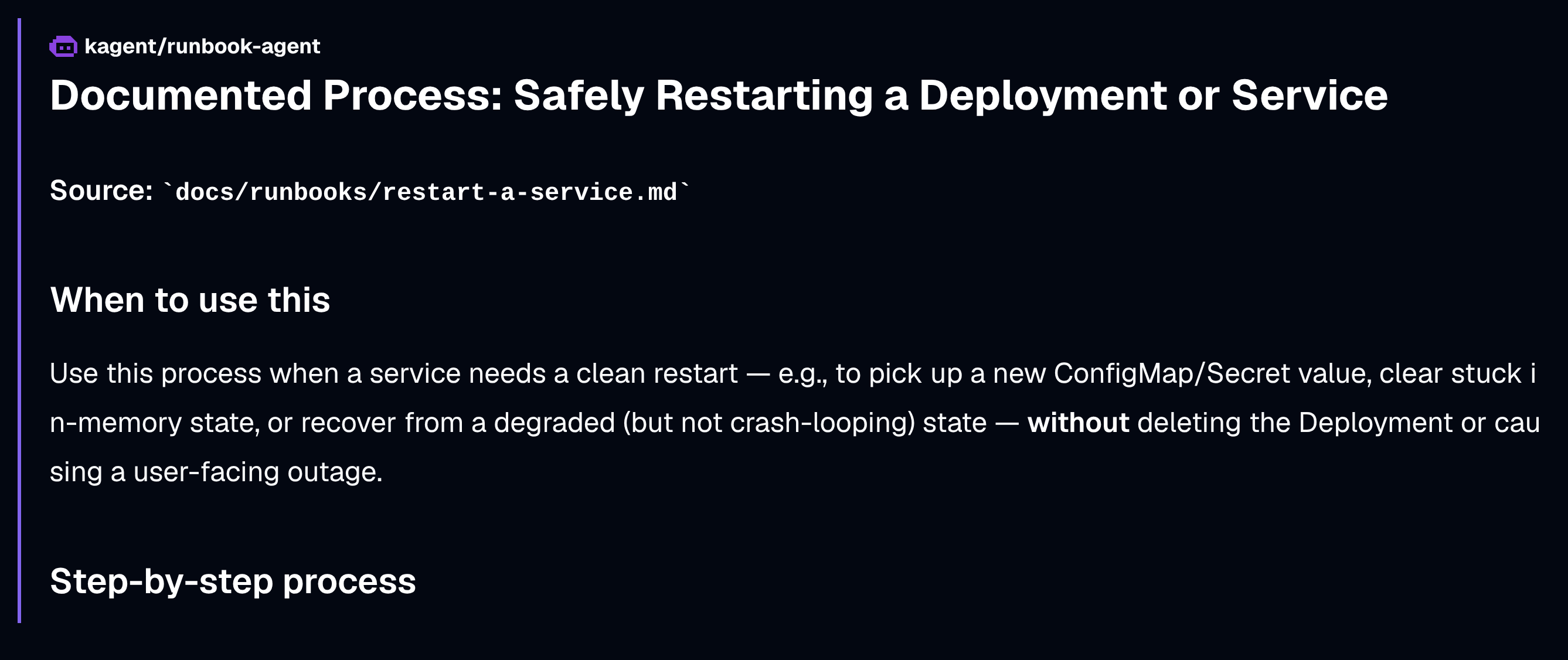
The answer comes back citing the actual source: docs/runbooks/restart-a-service.md. Safely restarting a deployment or service, when to use it, the step by step process, important notes, rollback. All of it pulled straight from our internal documentation, the kind of thing that normally lives in a wiki or Confluence page nobody remembers to check mid-incident.
Question Two: Why Is This Failing?
For the second question, I deployed a pod with an image that doesn't exist, so it sits there in ImagePullBackOff. Then I asked:
"Why is my pod broken demo in the default namespace failing?"
The agent goes and investigates using the real tools on the right side of the dashboard, describe resource, get events, get pod logs, then comes back with the root cause: image pull back off, the image doesn't exist, the pod is stuck pending, and the key event messages that prove it.
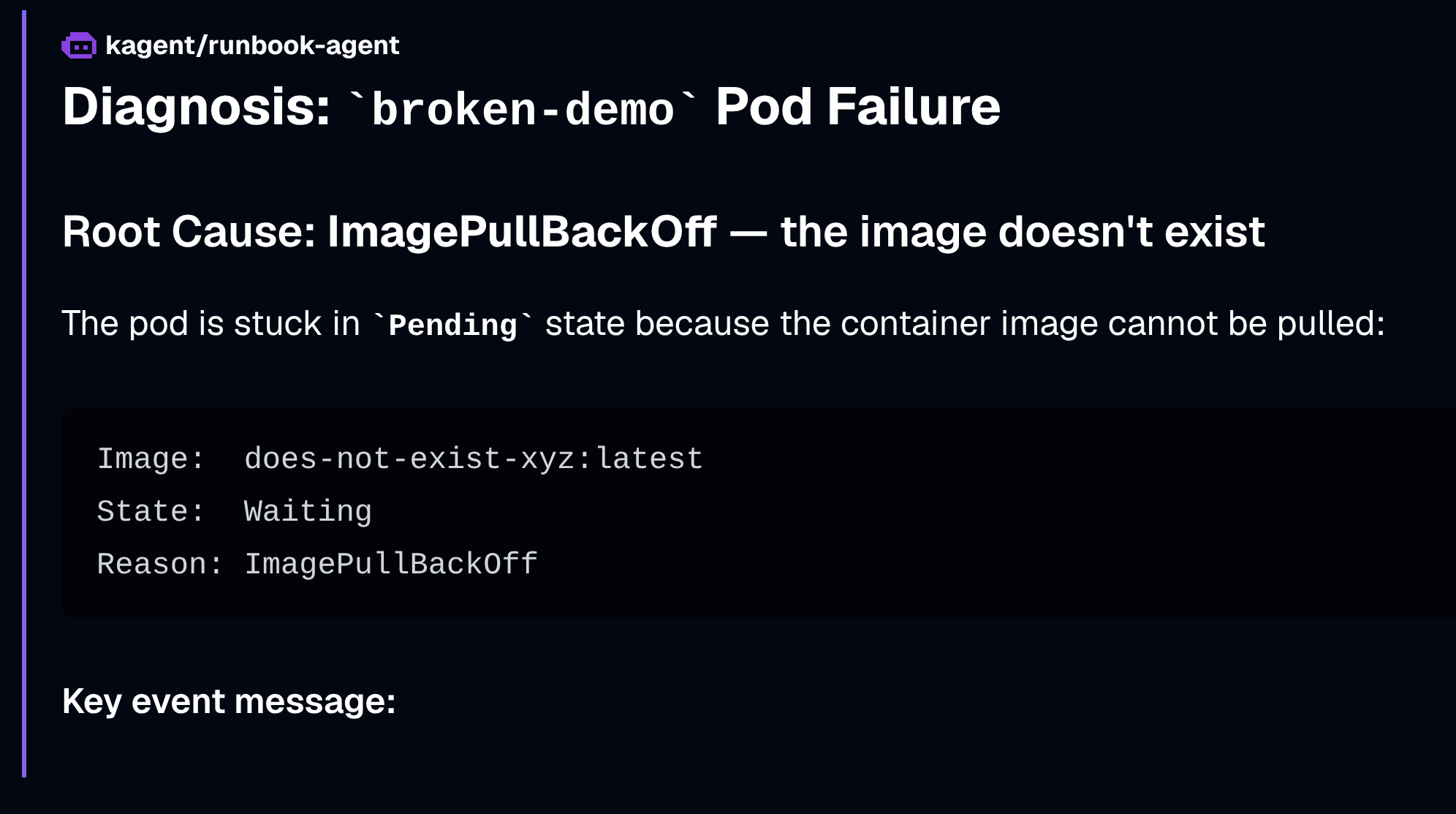
Here's the part worth slowing down on. The response also says this:
"I didn't find an exact runbook for image pull back off specifically, but our crash loop back runbook covers the general diagnosis."
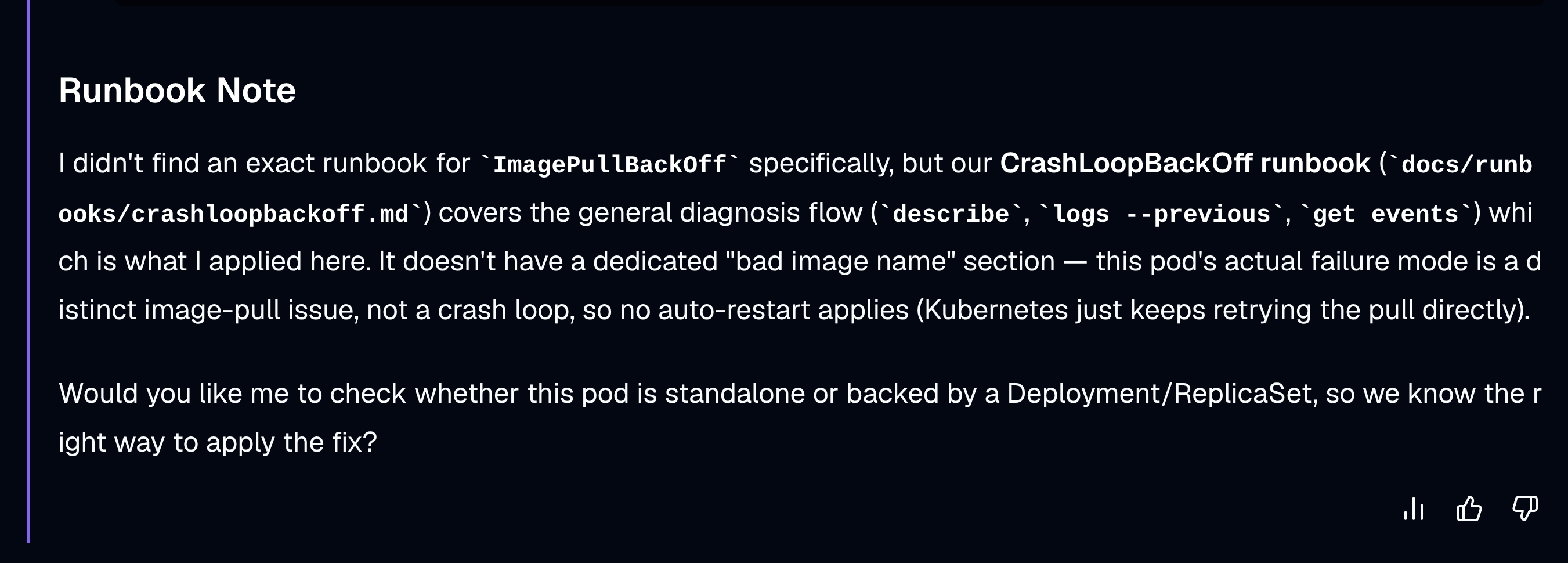
It checked. It didn't fabricate a citation that wasn't there, it told me honestly that no exact runbook existed and pointed at the closest one. That's your signal to go add a runbook for that scenario, and next time it'll be covered.
Under the Hood: Two Things Happened
So how did that actually work? Two things happened on that last question: it pulled live data straight from the cluster, and it searched a knowledge base of our own documentation. Let's break both apart, starting with the docs.
The Runbooks Are Just Markdown
Inside the repo, docs/runbooks/ has a handful of files: a pod stuck in CrashLoopBackOff, an OOMKilled pod, safely restarting a service, a PVC stuck in Pending. Open restart-a-service.md and it's a plain markdown file: description, when to use it, the process, important notes, rollback. Nothing kagent-specific about the format. In your environment, this could be your actual internal wiki content, exported straight to markdown.
$ tree docs/runbooks && tree agents
docs/runbooks
├── config.yaml
├── crashloopbackoff.md
├── oomkilled.md
├── pvc-stuck-pending.md
├── restart-a-service.md
└── runbooks.db

1 directory, 6 files
agents
├── runbook-agent.yaml
├── simple-fetch-agent.yaml
└── simple-k8s-agent.yaml

1 directory, 3 files
That's the entire footprint. Four markdown runbooks and a config file in docs/runbooks/, runbooks.db generated alongside them once you index, and runbook-agent.yaml sitting next to the agent manifests from the earlier demos in agents/. No hidden moving parts.
The Agent Manifest
The runbook-agent.yaml manifest ties it together. It runs in the kagent namespace, and its system message tells it exactly how to use its two kinds of tools:
"You have two kinds of tools. There are Kubernetes tools which help you with live state for the cluster, and then there's query documentation, which searches a knowledge base for internal troubleshooting runbooks. Every time you call query documentation, pass the runbook's database name. When diagnosing a live problem, first inspect the live cluster, and then also check query documentation for a matching runbook to cite alongside the live findings."
That instruction is what made both of those answers happen the way they did.
Under tools, the manifest wires up two MCP (Model Context Protocol) servers: the built-in kagent Kubernetes tool server, and a new one we created ourselves, runbook-search-toolserver, pointed at mcp-runbook-search.kagent.svc.cluster.local:3001. That's a small MCP server running inside the cluster with access to the vector database, so the agent can talk to it just like any other tool.
Both pieces are ordinary Kubernetes objects once deployed, nothing exotic:
$ kubectl get po
NAME                                   READY   STATUS    RESTARTS   AGE
mcp-runbook-search-5f6b886896-qzpl8    1/1     Running   0          22h
runbook-agent-5988446f78-tdbpj         1/1     Running   0          22h

$ kubectl get svc
NAME                  TYPE        CLUSTER-IP      EXTERNAL-IP   PORT(S)    AGE
mcp-runbook-search    ClusterIP   10.96.169.152   <none>        3001/TCP   22h
runbook-agent         ClusterIP   10.96.139.97    <none>        8080/TCP   22h
The mcp-runbook-search Service is listening on port 3001, exactly what the RemoteMCPServer manifest points at. runbook-agent itself is just another pod behind another ClusterIP Service, same shape as any other kagent agent. (Trimmed here to the two objects this demo actually touches, in a real cluster kubectl get po also shows kagent's other bundled agents, its controller, dashboard, and Postgres.)
Why This Needed Embeddings, Not Keyword Search
The retrieval half of RAG is the hard part, and a plain keyword search doesn't cut it. If someone asks "why won't my pod start," that should match a runbook titled "CrashLoopBackOff" even though none of those words overlap. That's what embeddings solve.
An embedding turns a chunk of text into a list of numbers, a vector, that captures its meaning rather than its exact wording. Text with similar meaning ends up with vectors that sit close together, so "why won't my pod start" and "CrashLoopBackOff troubleshooting" can end up close in that space even without sharing a single word.
The Config File
Indexing runs through doc2vec, kagent's own recommended tool for turning documents into a searchable vector database. Inside docs/runbooks/config.yaml, the setup is short. The embedding provider is OpenAI, the model is text-embedding-3-large. Then it points at a local directory of runbooks, a product name, and a database path, runbooks.db.
The Database Is Just a File
runbooks.db is a plain SQLite file, using an extension called sqlite-vec that adds vector search as a SQL feature. One file on disk. You don't need an external vector database like Pinecone or Qdrant for something this size.
Peek inside it and you'll find twelve stored chunks, our four runbooks split into three chunks each. Every chunk has its original text, which file it came from, and its embedding vector, all sitting in that one file.
Three Commands, Three Distinct Jobs
The pipeline that builds all of this is three make commands, and each one does something genuinely different.
| Command | What it does | Runs in Kubernetes? |
|---|---|---|
index-runbooks | A Node script calling OpenAI's embedding API and writing runbooks.db to disk. | No, runs entirely on your laptop. |
build-runbook-server | Bakes runbooks.db into a Docker image and loads that image into the cluster's nodes. | No pod exists yet, just makes the image available. |
deploy-runbook-agent | The kubectl apply that creates the MCP runbook search deployment and the agent itself. | Yes, this is the command that starts the pod and makes query_documentation queryable. |
deploy-runbook-agent is the one worth remembering. It's the step that starts the actual pod whose process opens runbooks.db and starts serving query_documentation over MCP, the embeddings only become queryable once this step runs.
Here's the actual Makefile behind all three:
DOC2VEC_VERSION := 2.10.5
DOC2VEC_COMMIT := 106a500e74dc9eff84d6d055bb06e0c90a0020ea
RUNBOOK_IMAGE := mcp-runbook-search:demo

.PHONY: index-runbooks
index-runbooks:
	@if [ -z "$$OPENAI_API_KEY" ]; then echo "Please pass OPENAI_API_KEY=..." && exit 1; fi
	OPENAI_API_KEY=$$OPENAI_API_KEY npx --yes doc2vec@$(DOC2VEC_VERSION) docs/runbooks/config.yaml

.PHONY: build-runbook-server
build-runbook-server:
	@test -f docs/runbooks/runbooks.db || (echo "docs/runbooks/runbooks.db not found - run 'make index-runbooks' first" && exit 1)
	rm -rf .build/doc2vec
	mkdir -p .build
	git clone --quiet --no-checkout https://github.com/kagent-dev/doc2vec.git .build/doc2vec
	git -C .build/doc2vec checkout --quiet $(DOC2VEC_COMMIT)
	cp docs/runbooks/runbooks.db .build/doc2vec/mcp/runbooks.db
	docker build -f mcp/mcp-runbook-search.Dockerfile -t $(RUNBOOK_IMAGE) .build/doc2vec/mcp
	kind load docker-image $(RUNBOOK_IMAGE) --name $(KIND_CLUSTER_NAME)

.PHONY: deploy-runbook-agent
deploy-runbook-agent:
	@if [ -z "$$OPENAI_API_KEY" ]; then echo "Please pass OPENAI_API_KEY=..." && exit 1; fi
	@kubectl -n kagent create secret generic mcp-runbook-openai-key --from-literal=api-key=$$OPENAI_API_KEY --dry-run=client -o yaml | kubectl apply -f -
	kubectl apply -f mcp/mcp-runbook-search.yaml
	kubectl rollout status deployment/mcp-runbook-search -n kagent --timeout=60s
	kubectl apply -f agents/runbook-agent.yaml
A few details in there worth calling out:
- Both
index-runbooksanddeploy-runbook-agentstart with a guard clause,@if [ -z "$$OPENAI_API_KEY" ]; then ... exit 1; fi, that fails fast with a clear message instead of letting a missing key surface as a confusing error three steps later. build-runbook-serverdoesn't vendor doc2vec's serving code into this repo. It clones it fresh into.build/doc2vecand checks out a pinned commit (DOC2VEC_COMMIT), so the build stays reproducible even if upstream changes, no surprise breakage from a moving dependency.kind load docker-imageis what gets the freshly built image onto the cluster's nodes without needing a container registry at all, useful for a local demo, not something you'd do in production.deploy-runbook-agentrunskubectl rollout statuson the MCP server before applying the agent. That's deliberate: without waiting, the agent's own one-shot startup tool discovery can race the MCP server coming up and fail with a connection error that only clears on a manual restart.
If you add new runbooks later, you just re-index, rebuild the image, and roll the deployment. There's no live "watch the folder" auto-update, worth knowing if you're planning to run this for real.
Final Thoughts
That's the whole pattern. Take your team's existing docs, embed them, expose them as a tool, and give your agent both that knowledge and live access to the cluster.
It's not a chatbot that knows generic Kubernetes commands. It's an agent that knows your environment and your team's process.
The runbooks, the manifests, the make file, all of it is in the repo, linked below. Try swapping in your own docs folder and see what happens.
If RAG, agents, and LLMs are still new to you, this is exactly what I cover in the AI Platform Engineering Bootcamp inside TeKanAid Academy.
FAQ
What does RAG mean for a Kubernetes AI agent?
RAG (retrieval augmented generation) lets a Kubernetes AI agent search your team's own documents, like internal runbooks, before answering, instead of relying only on what the underlying LLM was trained on. The agent retrieves the relevant passage and includes it in its answer, so responses can cite your actual documented process rather than generic Kubernetes advice.
What database does kagent use to store the runbook embeddings?
kagent's runbook agent stores embeddings in runbooks.db, a plain SQLite file using the sqlite-vec extension for vector search. There's no separate vector database service to run or manage.
Do I need an external vector database like Pinecone or Qdrant?
Not for a runbook collection this size. SQLite with sqlite-vec handles vector search as a SQL feature inside a single file, which is enough for a team's internal documentation. A dedicated vector database becomes worth considering at much larger scale.
Can I use my own runbooks instead of the sample ones?
Yes. Point docs/runbooks/config.yaml's local directory source at your own markdown files, run index-runbooks to re-embed them, then build-runbook-server and deploy-runbook-agent to rebuild and redeploy. The agent's tool wiring doesn't need to change.
Code
Hi and Welcome!
Join the Newsletter and get FREE access to all my Source Code along with a couple of gifts.