

Write-only attributes and ephemeral resources eliminate the terraform state security nightmare
Video
The Terraform State Security Problem
I’ve said it hundreds of times: Terraform state files expose your secrets.
Even if your plan output masks those secrets, your terraform state file is still showing them in plain text. API keys, database credentials, passwords, everything. It’s a silent security leak that’s easy to overlook until it’s too late. Anyone with access to your terraform state can grab your secrets.
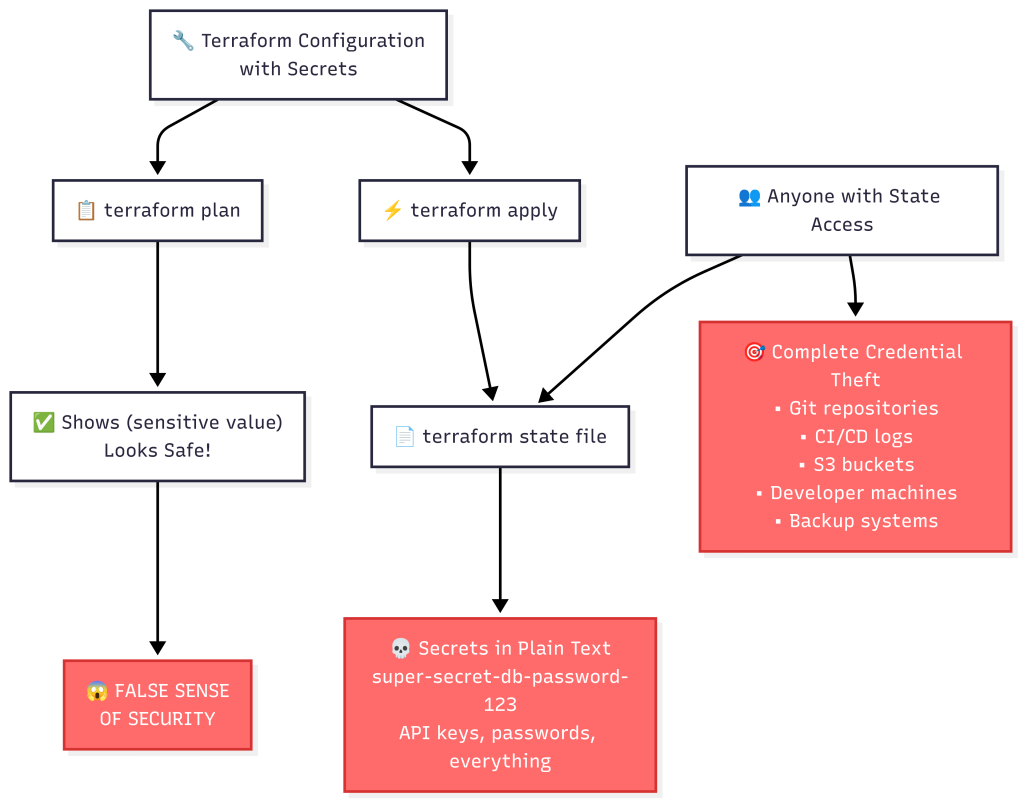
The false sense of security is the biggest danger:
- ✅
terraform planshows(sensitive value)– looks safe - ✅
terraform state showshows(sensitive value)– looks safe - ❌ Raw terraform state file shows everything in plain text – complete exposure
For years, Terraform practitioners have been caught in this security dilemma:
- Store secrets in terraform state → Security risk
- Don’t use Terraform for secrets → Infrastructure as Code gaps
- Use external secret management without Terraform → Complex workflows and drift
Today, that changes. Terraform 1.11+ introduces write-only attributes and ephemeral resources, fundamentally transforming how we handle secrets without compromising terraform state security. This guide demonstrates the features using Terraform v1.12.1 and Vault v1.18.4 with a comprehensive educational demo that includes real PostgreSQL dynamic secrets.
Prerequisites
Version Requirements:
- Terraform 1.11+ (write-only attributes)
- Terraform 1.10+ (ephemeral resources)
- HashiCorp Vault Provider with write-only support 5.0+
- This demo tested with: Terraform v1.12.1 and Vault v1.18.4
⚠️ Production Warning: The demo includes hardcoded secrets for educational purposes only. Never use hardcoded secrets in production – always use environment variables or secure secret management systems.
What Are Write-Only Attributes?
Write-only attributes are a revolutionary new feature that allows you to:
- ✅ Pass secret values to Terraform resources
- ✅ Use them in your infrastructure provisioning
- ✅ Never store them in terraform state or plan files
- ✅ Accept ephemeral values that don’t need to be consistent between plan and apply
Think of them as “write-only memory” for Terraform – you can write to them, but they’re never persisted in your terraform state.
Real-World Configuration Patterns
⚠️ Production Warning: The demo shows hardcoded secrets for educational purposes. In production, always use environment variables:
# ❌ NEVER DO THIS (demo only)
password = "super-secret-db-password-123"

# ✅ PRODUCTION APPROACH
password_wo = var.db_password  # Fed from environment variable
Key Configuration Elements:
- Use
data_json_woinstead ofdata_json - Use
password_woinstead ofpassword - Always include
*_wo_versionfor update tracking - Use
ephemeralblocks for secret retrieval - Verify with
grepcommands that no secrets appear in terraform state
Educational Demo: See the Problem First, Then the Solution
I’ve created a comprehensive educational demo that shows both the terraform state security problem AND the solution. This approach is perfect for learning and presentations because you experience the security nightmare first-hand, then see the dramatic improvement.
Phase 1: The Terraform State Security Nightmare (Educational)
Let’s start by demonstrating what happens when you DON’T use write-only attributes and how it compromises terraform state security:
# Start the educational demo sequence
./scripts/start-postgres-dev.sh
./scripts/start-vault-dev.sh
source scripts/setup-env.sh

# Show the DANGEROUS traditional approach first
./scripts/demo-insecure-secrets.sh
Here’s what the insecure demo (examples/insecure/insecure-demo.tf) shows:
# ⚠️  DANGEROUS: Traditional approach using regular data_json
resource "vault_kv_secret_v2" "insecure_database_config" {
  mount = vault_mount.insecure_demo.path
  name  = "database/postgres"

  # 💀 SECURITY NIGHTMARE: Using regular data_json attribute
  # These secrets will be VISIBLE in:
  # 1. terraform plan output (masked as "sensitive" but still dangerous)
  # 2. terraform.tfstate file in plain text!
  # 3. Any logs or CI/CD outputs that capture state
  data_json = jsonencode({
    host     = "production-db.company.com"
    port     = "5432"
    database = "myapp"
    username = "app_user"
    password = "super-secret-db-password-123" # 💀 EXPOSED!
    ssl_mode = "require"
  })
}

# ⚠️  DANGEROUS: Database connection with exposed root password
resource "vault_database_secret_backend_connection" "insecure_postgres" {
  postgresql {
    # 💀 This root password will be VISIBLE in terraform.tfstate!
    username = "postgres"
    password = "super-secret-db-password-123" # 💀 EXPOSED IN STATE!
  }
}
When you run the insecure demo, you’ll see:
- Terraform plan looks safe – shows
(sensitive value) - But the terraform state file reveals everything –
grep "super-secret-db-password-123" terraform.tfstatefinds 7+ matches! - Complete credential exposure – anyone with terraform state access can extract all production secrets
Phase 2: The Solution
Now run the secure demo to see how write-only attributes protect your terraform state:
# Show the SECURE approach with write-only attributes
./scripts/demo-secure-secrets.sh
Here’s what the secure demo (examples/secure/complete-demo.tf) demonstrates:
# ✅ SECURE: Store database credentials using write-only attributes
resource "vault_kv_secret_v2" "database_config" {
  mount = vault_mount.demo.path
  name  = "database/postgres"

  # 🔒 WRITE-ONLY ATTRIBUTE: Secrets never stored in state!
  data_json_wo = jsonencode({
    host     = "production-db.company.com"
    port     = "5432"
    database = "myapp"
    username = "app_user"
    password = "super-secret-db-password-123" # 🔒 PROTECTED!
    ssl_mode = "require"
  })

  # Version tracking for secure updates
  data_json_wo_version = var.secret_version
}

# ✅ SECURE: Database connection using write-only password
resource "vault_database_secret_backend_connection" "postgres" {
  postgresql {
    # 🔒 WRITE-ONLY ATTRIBUTE: Root password never stored in state!
    username            = "postgres"
    password_wo         = "super-secret-db-password-123" # 🔒 PROTECTED!
    password_wo_version = var.secret_version
  }
}
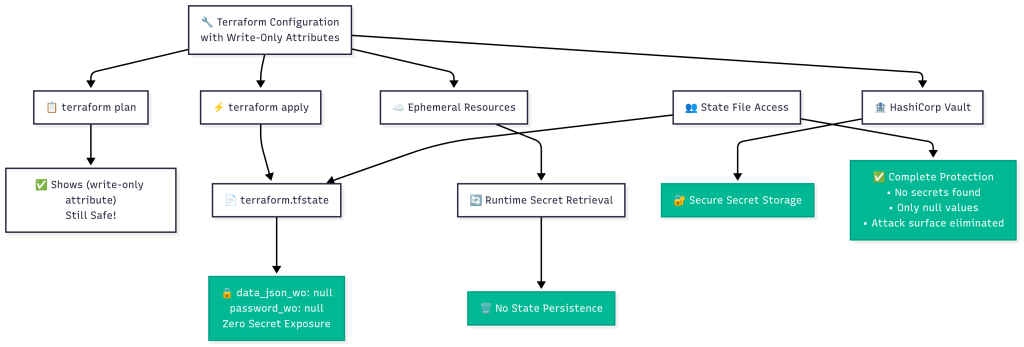
When you run terraform plan, you’ll see:
# vault_kv_secret_v2.database_config will be created
+ resource "vault_kv_secret_v2" "database_config" {
    + data_json_wo         = (write-only attribute)  # 🔒 Never shown!
    + data_json_wo_version = 1
    + id                   = (known after apply)
    + mount                = "demo-secrets"
    + name                 = "database/postgres"
  }
And most importantly, when you check the terraform state file:
cat terraform.tfstate | grep -A 3 -B 1 '"data_json_wo":'
# Output: "data_json_wo": null,

grep "super-secret-db-password-123" terraform.tfstate
# Output: (empty - no matches!)
Advanced Demo: Write-Only Attributes + Ephemeral Resources
The same complete secure demo (examples/secure/complete-demo.tf) shows the full integration of write-only attributes with ephemeral resources. This is where terraform state security reaches its peak.
Ephemeral Resources: Retrieving Secrets Without Terraform State Storage
# ✅ SECURE: Retrieve database config without storing in state
ephemeral "vault_kv_secret_v2" "db_config" {
  mount = vault_mount.demo.path
  name  = vault_kv_secret_v2.database_config.name

  # Defer until mount is created
  mount_id = vault_mount.demo.id
}

# ✅ SECURE: Generate dynamic database credentials (ephemeral)
ephemeral "vault_database_secret" "dynamic_db_creds" {
  mount = vault_mount.database.path
  name  = vault_database_secret_backend_role.app_role.name

  # Defer until database role is created
  mount_id = vault_mount.database.id
}
Secret Composition: The Ultimate Terraform State Security Model
# ✅ SECURE: Create composite configuration using ephemeral secrets
resource "vault_kv_secret_v2" "complete_app_config" {
  mount = vault_mount.demo.path
  name  = "app/complete-secure-config"

  # 🔒 WRITE-ONLY ATTRIBUTE: Complete config - never stored in state
  data_json_wo = jsonencode({
    # Static database connection using ephemeral retrieval
    database_url = format(
      "postgresql://%s:%s@%s:%s/%s?sslmode=%s",
      ephemeral.vault_kv_secret_v2.db_config.data.username,
      ephemeral.vault_kv_secret_v2.db_config.data.password,
      ephemeral.vault_kv_secret_v2.db_config.data.host,
      ephemeral.vault_kv_secret_v2.db_config.data.port,
      ephemeral.vault_kv_secret_v2.db_config.data.database,
      ephemeral.vault_kv_secret_v2.db_config.data.ssl_mode
    )

    # Dynamic database credentials (auto-expiring)
    dynamic_database = {
      username = tostring(ephemeral.vault_database_secret.dynamic_db_creds.username)
      password = tostring(ephemeral.vault_database_secret.dynamic_db_creds.password)
      ttl      = "1h"
    }

    # Application metadata
    security_level = "MAXIMUM - NO SECRETS IN STATE!"
    approach       = "Write-only attributes + Ephemeral resources"
  })

  data_json_wo_version = var.secret_version
}
This demonstrates the complete terraform state security model:
- Static secrets stored with write-only attributes
- Dynamic secrets generated on-demand with auto-expiration
- Secret composition combining ephemeral resources into new configurations
- Zero terraform state exposure – no secrets ever stored in terraform state
Real PostgreSQL Dynamic Secrets: The Complete Demo
The demo includes a real PostgreSQL database running in Docker to showcase Vault’s database secrets engine with actual auto-expiring credentials.
Testing Dynamic Credentials
When you run the complete demo, you can actually test dynamic credentials:
# Generate dynamic PostgreSQL credentials
vault read database/creds/app-role
# Output:
# Key                Value
# ---                -----
# lease_id           database/creds/app-role/ybbtk7vwL5jeQB7QIAGqkdP8
# lease_duration     1h
# lease_renewable    true
# password           ORC71M1C-mZjT1ewqkYt
# username           v-token-app-role-PbzYtG6qwATCcteSSX6j-1750864908

# Test the actual database connection
docker exec -it terraform-demo-postgres psql \
  -U v-token-app-role-PbzYtG6qwATCcteSSX6j-1750864908 \
  -d postgres \
  -c "SELECT current_user, now(), 'Dynamic credentials work!' as message;"
The result? Real PostgreSQL users created by Vault that automatically expire after 1 hour!
Educational Script Features
The demo scripts (scripts/demo-insecure-secrets.sh and scripts/demo-secure-secrets.sh) provide a complete educational experience:
Insecure Demo Script Features:
- ✅ Shows traditional approach security problems
- ✅ Demonstrates state file secret exposure with real searches
- ✅ Analyzes attack vectors and security impact
- ✅ Searches state file for exposed credentials
- ✅ Educational warnings and explanations throughout
Secure Demo Script Features:
- ✅ Demonstrates secure write-only attributes in action
- ✅ Shows ephemeral resources working without state storage
- ✅ Tests real PostgreSQL dynamic credentials
- ✅ Analyzes secure state file showing null values
- ✅ Complete security verification and state file analysis
How Updates Work
Since write-only attributes aren’t stored in state, updates work through version tracking:
# Update secrets by incrementing version
terraform apply -var="secret_version=2"

# The plan will show:
# ~ data_json_wo_version = 1 -> 2
# Secret values are never shown in plan output!
Complete Demo Repository Structure
terraform-write-only/
├── examples/
│   ├── secure/
│   │   └── complete-demo.tf     # ✅ SECURE: Write-only + ephemeral resources
│   └── insecure/
│       └── insecure-demo.tf     # ⚠️  Educational: Shows security problem
├── scripts/
│   ├── demo-insecure-secrets.sh # 📚 Educational: Security problem
│   ├── demo-secure-secrets.sh   # 📚 Educational: Secure solution
│   ├── setup-env.sh             # Environment setup
│   └── [PostgreSQL and Vault management scripts]
This structure provides:
- Educational progression showing the problem then solution
- Interactive scripts for complete guided learning experience
- Production-ready examples for real-world implementation
The Terraform State Security Impact
This isn’t just a convenience feature – it’s a fundamental terraform state security improvement:
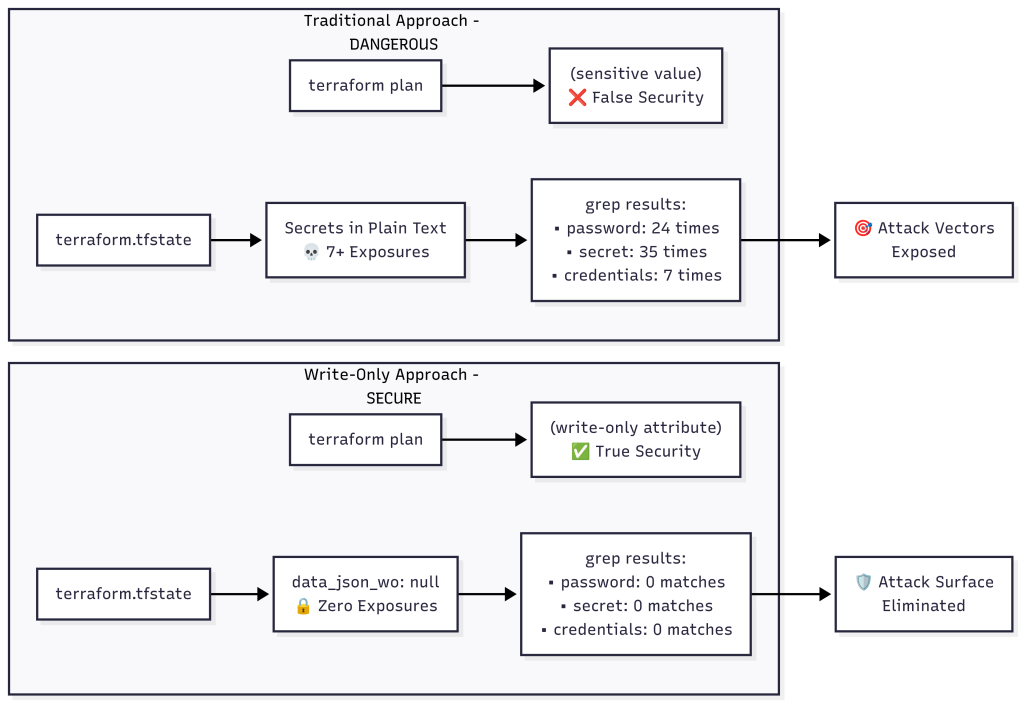
Before (Traditional Approach) – The Security Nightmare
# 😱 The false sense of security
terraform plan  # Shows (sensitive value) - looks safe
terraform state show vault_kv_secret_v2.config  # Shows (sensitive value) - looks safe

# 💀 But the raw terraform state file reveals everything
grep "super-secret-db-password-123" terraform.tfstate
# Returns: 7+ matches with complete credential exposure

# 💀 Extract secrets with jq
cat terraform.tfstate | jq '.resources[] | select(.type=="vault_kv_secret_v2") | .instances[0].attributes.data_json'
# Returns: Complete secret data in plain text

# 💀 Count the exposure
grep -c "password" terraform.tfstate  # Returns: 24 times
grep -c "secret" terraform.tfstate    # Returns: 35 times
grep -c "super-secret-db-password-123" terraform.tfstate  # Returns: 7 times
Attack Vectors:
- 🎯 Terraform state stored in version control
- 🎯 CI/CD logs containing state output
- 🎯 Shared state backends (S3, Terraform Cloud)
- 🎯 Developer machines with local state files
- 🎯 Backup systems containing state files
- 🎯 Anyone with terraform state access = complete secret access
After (Write-Only Attributes) – Complete Protection
# 🔒 Plan output still shows write-only attributes safely
terraform plan
# Shows: data_json_wo = (write-only attribute)

# 🔒 State show commands remain masked
terraform state show vault_kv_secret_v2.config
# Shows: data_json_wo = (sensitive value)

# 🔒 Raw terraform state file shows nothing
grep "super-secret-db-password-123" terraform.tfstate
# Returns: (empty - no matches!)

# 🔒 Write-only attributes are null in state
cat terraform.tfstate | jq '.resources[] | select(.type=="vault_kv_secret_v2") | .instances[0].attributes.data_json_wo'
# Returns: null

# 🔒 Ephemeral resources don't appear in state at all
terraform state list | grep ephemeral
# Returns: (empty - ephemeral resources never stored)

# 🔒 Verify complete protection
ls -la terraform.tfstate  # File exists but contains no secrets
grep -c "data_json_wo" terraform.tfstate  # Returns: 6 (all null values)
Security Analysis – What Went Right:
- ✅ Secrets show as write-only attributes in plan
- ✅ Write-only attributes are null in terraform state
- ✅ Ephemeral resources don’t appear at all in state
- ✅ Secrets safely stored in Vault
- ✅ Dynamic credentials work with real database
- ✅ Complete functionality with zero terraform state exposure
Getting Started Today
Run the Complete Educational Demo
You will find the code repo at the bottom of this article
# Clone the demo repository
git clone <your-demo-repo>
cd terraform-write-only

# Start the complete educational sequence
./scripts/start-postgres-dev.sh
./scripts/start-vault-dev.sh
source scripts/setup-env.sh

# See the terraform state security problem first
./scripts/demo-insecure-secrets.sh

# Experience the secure terraform state solution
./scripts/demo-secure-secrets.sh
Looking Ahead
This educational repository demonstrates the most significant advancement in terraform state security since the introduction of sensitive variables. The combination of:
- Write-only attributes for secret storage
- Ephemeral resources for secret retrieval
- Educational workflow showing problem → solution
- Real database integration with PostgreSQL
- Complete terraform state analysis for security verification
…represents a fundamental shift in how we approach Infrastructure as Code security.
Frequently Asked Questions
Q: Why is the “false sense of security” so dangerous?
A: This is the #1 terraform state security trap. Both terraform plan and terraform state show display (sensitive value) for secrets, making everything look secure. But the raw terraform state file contains everything in plain text:
# ✅ These commands look safe (masked output)
terraform plan        # Shows: (sensitive value)
terraform state show  # Shows: (sensitive value)

# ❌ But this reveals everything
cat terraform.tfstate | jq '.resources[].instances[].attributes'
# Shows: All secrets in plain text!
The danger: Developers think they’re secure because of the masked output, but anyone with terraform state file access can extract all secrets.
Q: How do write-only attributes differ from sensitive variables?
A: Sensitive variables are masked in output but still stored in terraform state files. Write-only attributes are never stored anywhere – not in plan files, terraform state files, or logs. They’re truly write-only.
# Sensitive variable - still stored in terraform state as sensitive
variable "db_password" {
  sensitive = true
}

# Write-only attribute - never stored in terraform state
resource "vault_kv_secret_v2" "config" {
  data_json_wo = jsonencode({
    password = "secret"  # Never stored in terraform state!
  })
}
Q: How do updates work if the values aren’t stored in state?
A: Updates use version tracking. When you change a write-only attribute, increment the version to signal Terraform that an update is needed:
resource "vault_kv_secret_v2" "config" {
  data_json_wo         = jsonencode({...})
  data_json_wo_version = var.secret_version  # Increment to update
}
Q: What happens during terraform import with resources that have write-only attributes?
A: Write-only attributes are set to null during import since their values can’t be read from the existing resource. You’ll need to provide the values and version during the next apply.
Q: Can I use write-only attributes with all Terraform providers?
A: No, providers must explicitly support write-only attributes. The HashiCorp Vault provider added support in recent versions. Check provider documentation for *_wo and *_wo_version attributes.
Q: Are there any performance implications?
A: Write-only attributes can actually improve performance because:
- Smaller state files (no secret storage)
- Reduced plan/apply times (less data to process)
- Better CI/CD performance (secrets not transferred in state)
Q: Can I migrate existing configurations to use write-only attributes?
A: Yes! Here’s the migration approach:
# Before (insecure) - secrets stored in terraform state
resource "vault_kv_secret_v2" "config" {
  data_json = jsonencode({
    password = "secret"
  })
}

# After (secure) - secrets never stored in terraform state
resource "vault_kv_secret_v2" "config" {
  data_json_wo         = jsonencode({
    password = "secret"
  })
  data_json_wo_version = 1
}
Migration steps:
- Update configuration with
*_woattributes - Run
terraform apply– Terraform will update the resource - Verify secrets are no longer in terraform state file
Q: Do I need ephemeral resources to use write-only attributes?
A: No, they’re independent features:
- Write-only attributes = Store secrets without state persistence
- Ephemeral resources = Retrieve secrets without state persistence
- Together = Complete secure secrets workflow
Q: How do I troubleshoot issues with write-only attributes?
A: Common troubleshooting approaches:
# 1. Verify provider supports write-only attributes
terraform providers schema -json | jq '.provider_schemas."registry.terraform.io/hashicorp/vault"'

# 2. Check for version mismatches
terraform plan  # Look for version changes

# 3. Enable detailed logging
export TF_LOG=DEBUG
terraform apply

# 4. Verify secrets aren't in terraform state
grep -r "your-secret-value" terraform.tfstate  # Should return empty
Q: What Terraform versions support these features?
A:
- Write-only attributes: Terraform 1.11+
- Ephemeral resources: Terraform 1.10+
- This demo uses: Terraform v1.12.1 with Vault provider
Q: Can I use write-only attributes in modules?
A: Yes! Pass secrets through module variables:
# Module usage
module "secure_vault" {
  source = "./modules/vault-secrets"

  secret_data    = var.database_credentials
  secret_version = var.secret_version
}

# Module definition
resource "vault_kv_secret_v2" "config" {
  data_json_wo         = var.secret_data
  data_json_wo_version = var.secret_version
}
Q: What happens if I accidentally use a regular attribute instead of write-only?
A: The demo shows exactly this scenario! Run ./scripts/demo-insecure-secrets.sh to see how regular attributes expose secrets in terraform state files. Always verify with:
# Check for exposed secrets in terraform state (should return nothing with write-only)
grep "your-secret-value" terraform.tfstate
Additional Resources
For deeper technical understanding and implementation details, explore these official documentation resources:
- Terraform Docs on write_only ► View Documentation
- Write-only attributes in the Vault provider ► View Documentation
- Ephemeral Resources in Terraform ► View Documentation
Conclusion
The terraform state security nightmare is finally over.
I’ve had many people ask me about this particular concept, and I’m glad that HashiCorp has finally created something to help us solve the terraform state security problem. But remember – this is dependent on the provider, so make sure your provider supports write-only attributes.
Terraform 1.11’s write-only attributes, combined with ephemeral resources, solve the biggest pain point in Infrastructure as Code: secure terraform state management. This educational demo shows not just how to use these features, but WHY they’re revolutionary for terraform state security.
The transformation is dramatic:
- Before: 7+ secret exposures in terraform state, complete credential access for anyone
- After: Zero secrets in terraform state, null values only, complete protection
By experiencing the terraform state security problem first-hand and then seeing the dramatic improvement, you understand the true value of these features. The complete integration with real PostgreSQL dynamic secrets demonstrates production-ready capabilities.
The future of terraform state security is here, and this educational journey shows you exactly how to protect your infrastructure secrets.
⚠️ Critical Production Practices:
- Never hardcode secrets – always use
var.secret_namefed by environment variables - Use version tracking for secret updates:
terraform apply -var="secret_version=2" - Test dynamic credentials to ensure they work before deployment
- Verify terraform state security after every apply with
grepcommands
Code
Hi and Welcome!
Join the Newsletter and get FREE access to all my Source Code along with a couple of gifts.